
 ALL ARTICLES



A prototype can be surprisingly convincing. It answers questions correctly, demonstrates the core idea, and gives stakeholders confidence that the concept works. For a while, that is enough.
Then the conversation changes. Instead of asking whether the AI can perform a task, teams begin asking whether real users can depend on it every day.
That shift marks the difference between experimentation and deployment. The challenge is no longer proving the idea. The challenge is learning how to transition AI prototype into production-ready software that can handle growth, change, and real-world expectations without breaking under pressure.
The Prototype Solved One Problem. Production Must Solve Thousands.
Most AI prototype development efforts begin with a focused objective. The team wants to validate an idea, test a workflow, or prove a capability before investing further.
Production environments play by different rules.
Testing Environments Rarely Reflect Real Usage
Internal testing usually happens under controlled conditions. The data is familiar, the workflow is understood, and unexpected behavior is limited.
Real-World Usage Introduces New Variables
Customers skip steps, enter incomplete information, upload unusual files, and use products in ways nobody anticipated during testing.
Production Readiness Requires More Than a Working Prototype
A prototype only needs to prove that something works. Production-ready AI software must continue working across thousands of interactions, edge cases, and changing business requirements.
What It Takes to Move From Prototype to Production
The moment a prototype leaves the hands of the people who built it, new questions start appearing. Some come from users. Others come from the business itself.
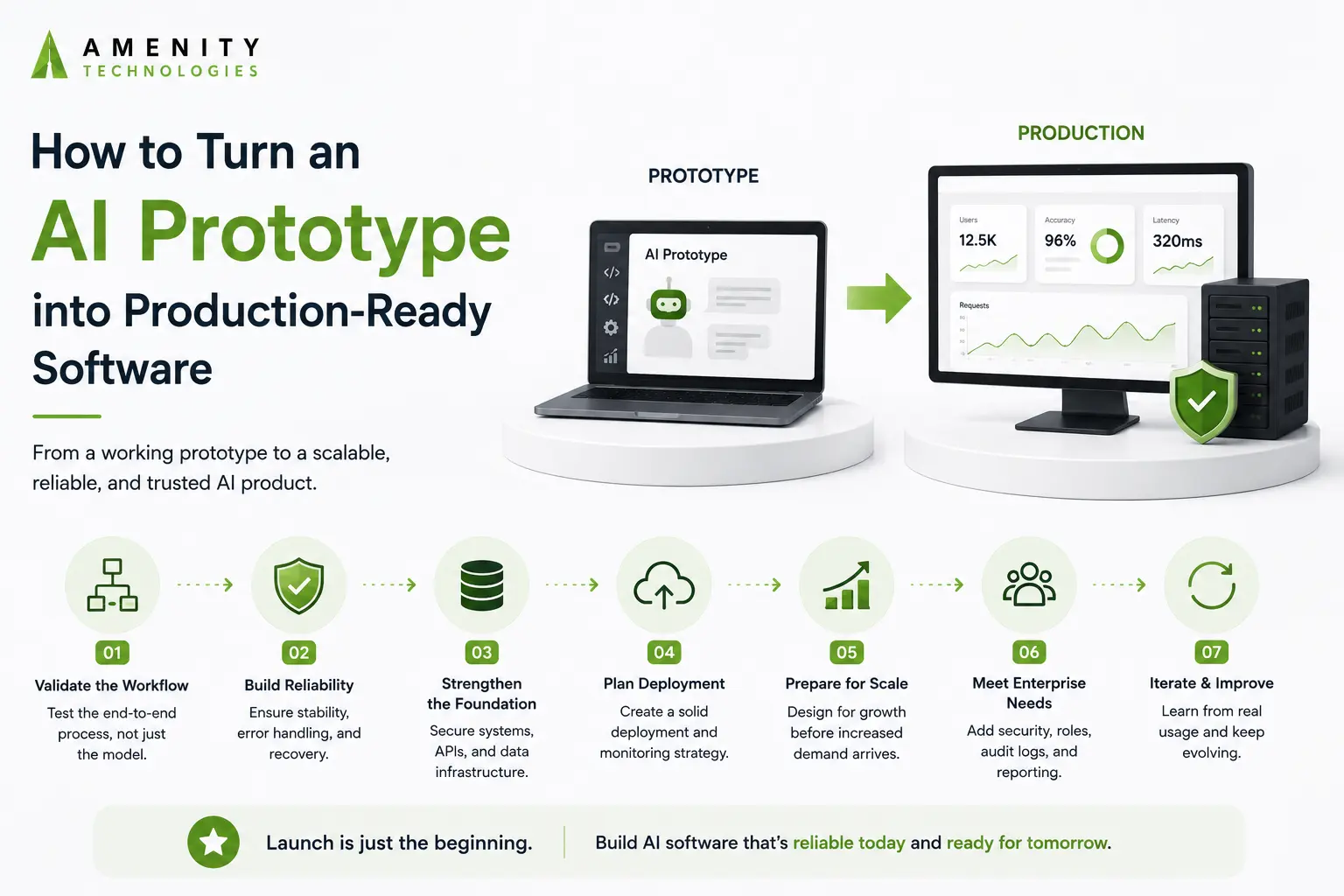
Step 1: Validate the Entire Workflow, Not Just the Model
A team may spend weeks testing whether the AI produces the right answer and only a few hours looking at everything around it.
That imbalance becomes obvious later. Files arrive in unexpected formats. Users skip steps. Data enters the system differently than anticipated. Before moving forward, it helps to follow the entire journey from input to outcome and look for weak spots along the way.
Step 2: Build Reliability Before Scale
Early users are usually forgiving. Customers are not.
A missed request, a dropped session, or an interrupted process might seem minor during testing. It feels very different once people depend on the software to complete real work. The stronger systems are usually the ones that learn how to recover before they learn how to scale.
Step 3: Strengthen the Systems Around the AI
The AI may be the reason users arrive, but it is rarely the only thing keeping the application running. During early development, login systems, APIs, databases, notifications, and background processes tend to attract little attention. Once usage grows, they become impossible to ignore.
A prototype can survive with shortcuts. Production systems usually cannot.
Step 4: Create an AI Deployment Strategy
Many teams think about deployment only when launch day gets close. That often creates unnecessary pressure.
A practical AI deployment strategy answers questions early. How will performance be monitored? What happens if a release causes problems? How will changes be tested before reaching users? The goal is not to predict every scenario. It is to avoid being surprised by the obvious ones.
Step 5: Prepare for Growth Before It Arrives
Growth has a habit of exposing assumptions.
Features that feel effortless with a few hundred users may behave very differently when activity increases. More requests, more data, and more workflows create demands that were never visible during testing.
The strongest scalable AI applications are rarely built after growth arrives. They are prepared for it beforehand.
Step 6: Prepare for Enterprise Requirements
The first version of a prototype often has one audience: the team building it. That changes quickly.
A manager wants reporting. Another department needs access. Someone asks who approved a recommendation or changed a setting last week.
These requests may seem unrelated to the AI itself, but they become part of everyday operations. That is why enterprise AI implementation usually involves much more than deploying a model.
Step 7: Treat Launch as the Beginning
Some of the most useful feedback arrives after launch.
People use features differently than expected. New requests appear. A workflow that looked complete six months ago suddenly needs adjustment.
It is quite normal. The AI software development lifecycle tends to be shaped by what happens after release just as much as what happened before it.
Why Some AI Prototypes Scale While Others Stall
Many prototypes prove the technology works.
Fewer prove they can support a growing business.
One common difference is that successful teams start preparing for operational realities earlier than expected. User management, permissions, reporting, background processing, and administration often arrive long before anyone planned for them.
A platform that begins with a single AI feature can eventually require moderation tools, approval workflows, audit trails, scheduling capabilities, or role-based access. None of these changes make the AI smarter. They make the software easier to run.
The transition from AI prototype development to production-ready AI software often happens through these practical improvements rather than dramatic technical breakthroughs.
In many cases, growth does not expose weaknesses in the model. It exposes assumptions made when the product was still small.
How Do You Know the Software Is Ready?
There is rarely a moment when a team announces that the prototype is officially production-ready. The shift is usually more subtle.
People start using it without second-guessing every result. New features can be added without worrying that something unrelated will suddenly stop working. Conversations shift away from proving the AI is useful and toward finding new ways to get more value from it.
That does not mean every issue has been eliminated. It means the software has reached a point where growth feels manageable rather than risky.
For many organizations, that is the clearest sign that the transition from prototype to production has actually happened.
Turning a Working Prototype Into a Trusted Product
Production software has to answer a different and important question: can people depend on it day after day?
Getting from one stage to the other usually involves far more than improving model performance. Teams end up revisiting workflows, handling edge cases, preparing for growth, and solving problems that never appeared during testing.
If you’re looking to transition an AI prototype into production-ready software, Amenity Technologies helps turn early concepts into systems that can support real users, real workloads, and the realities that come with growth.
FAQs
Q.1. What is the biggest mistake teams make when moving to production?
A: Many teams focus almost entirely on model performance and leave deployment, monitoring, permissions, and operational workflows for later.
Q.2. Can a successful AI prototype still fail after launch?
A: Yes. A prototype may perform well during testing but struggle once exposed to larger datasets, higher usage volumes, or unpredictable user behavior.
Q.3. Should AI software development stop after deployment?
A: No. The AI software development lifecycle continues after release through feedback, performance reviews, maintenance, and ongoing improvements.